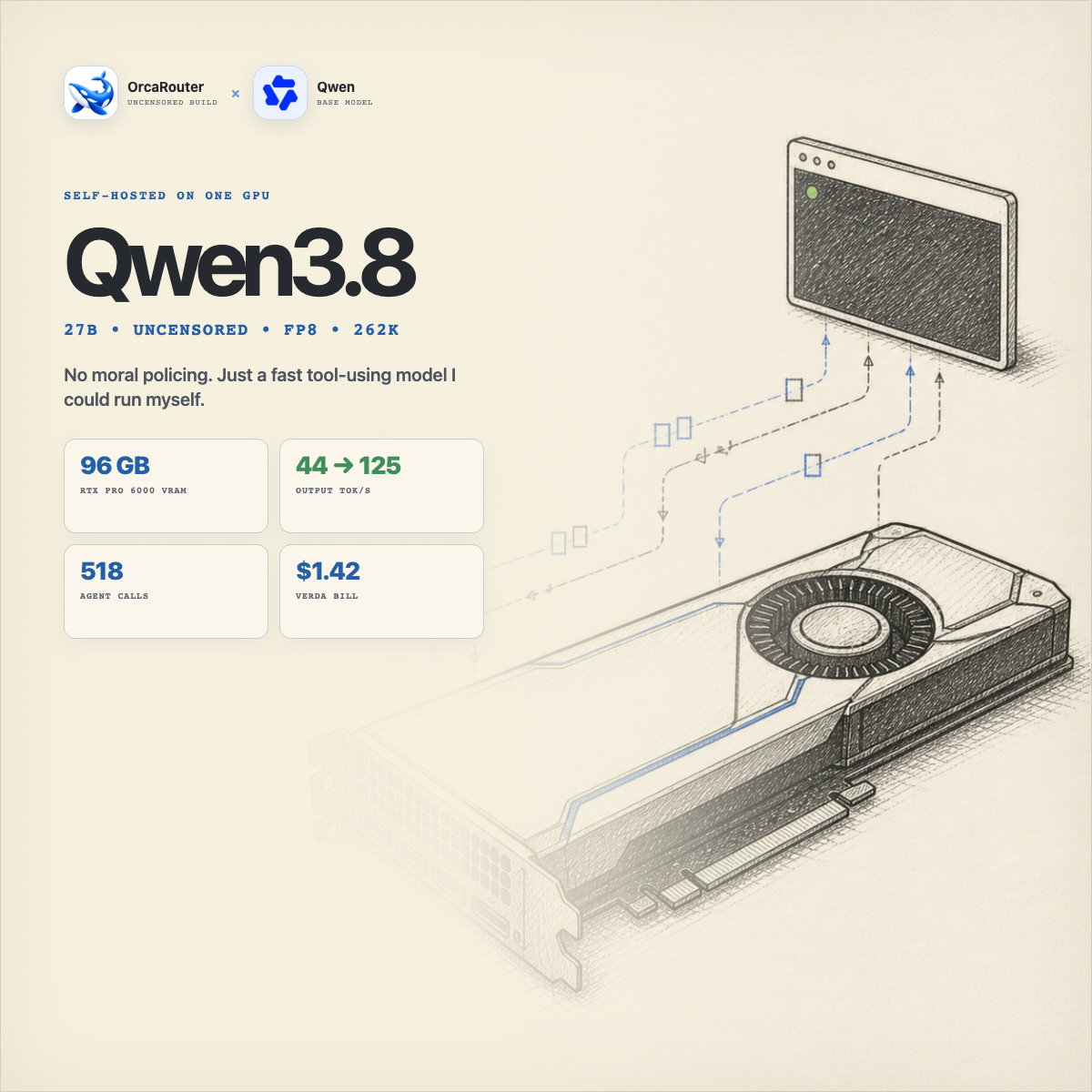
I Rented a 96 GB GPU and Took Uncensored Qwen3.8 From 44 to 125 tok/s
How I took an uncensored Qwen3.8 27B model from 42 to 125 tokens per second, used it for a real security investigation, and learned that I did not actually need 96 GB of VRAM.
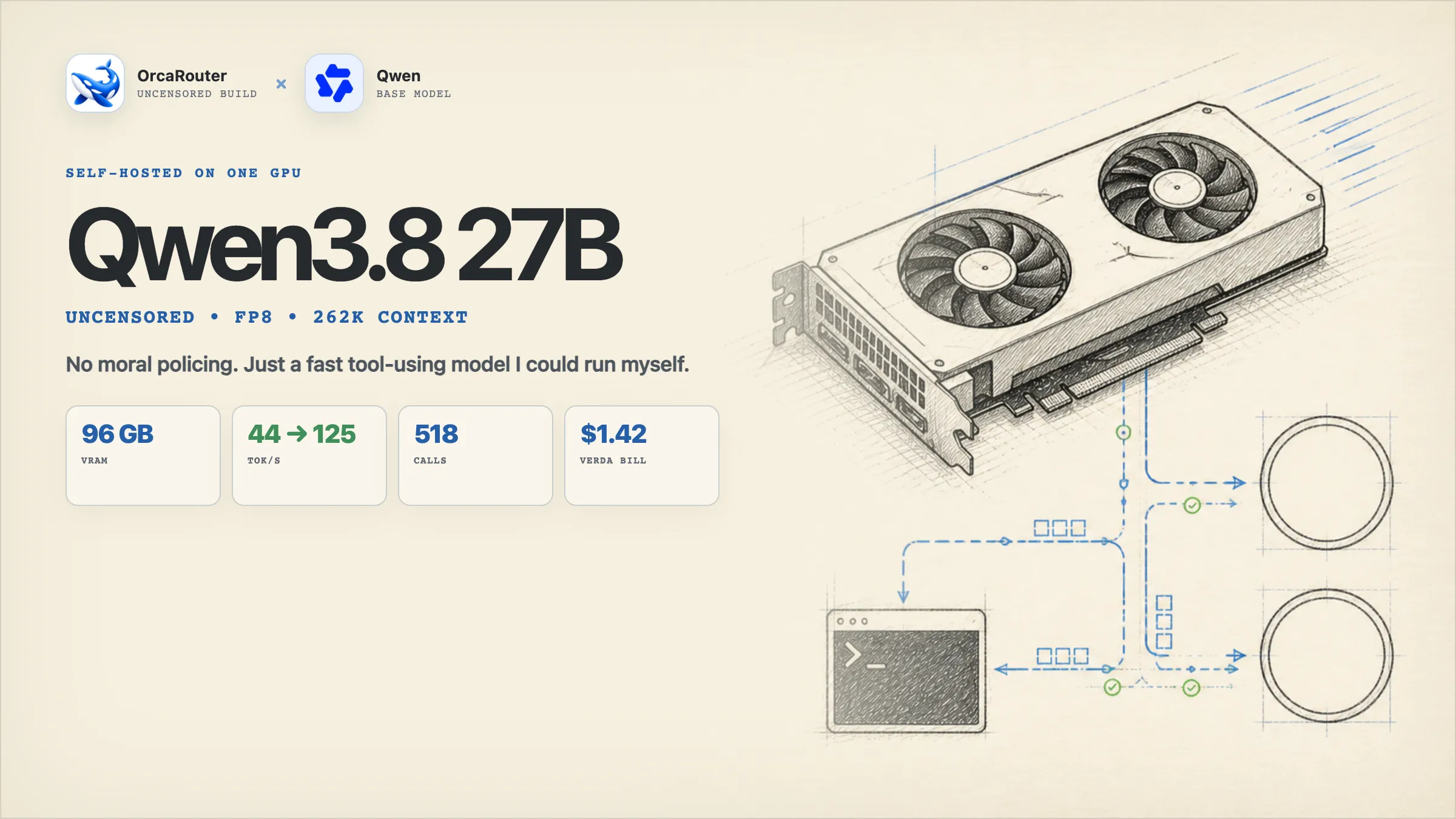
tl;dr
- I rented an RTX PRO 6000 Blackwell with 96 GB of VRAM and self-hosted
orcarouter/Qwen3.8-27B-Uncensored-FP8on that remote GPU through vLLM. - It was genuinely refreshing. I gave it the Ox Alpha investigation and it worked on the task. No sermons. No ritual begging. No pretending a terminal command was morally complicated.
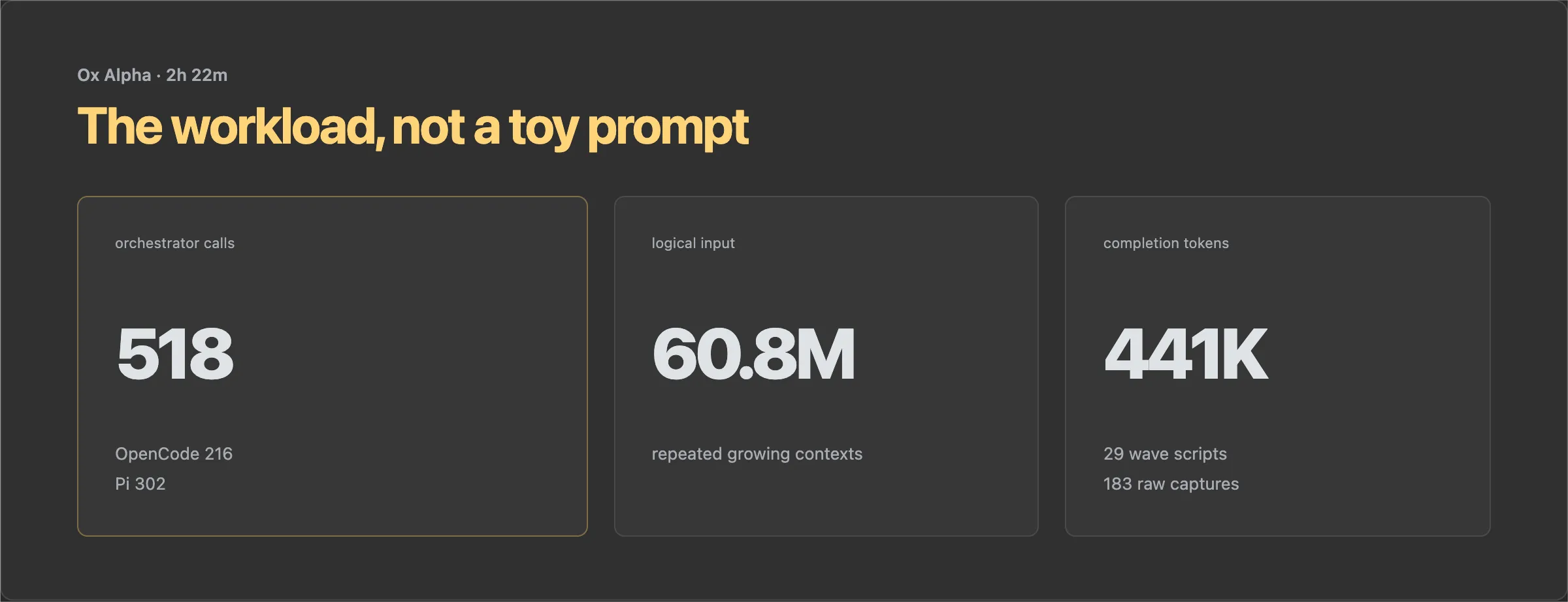
- I used it as the autonomous orchestrator behind my Ox Alpha investigation. Across OpenCode and Pi, it made 518 model calls over a 2 hour 22 minute window and processed 60.8 million logical input tokens.
- Verda billed $1.42 for the recorded 1 hour 30 minute RTX PRO 6000 run. The instance page shows $0.945/hour spot pricing. Coupon code
KAITCHUP-50gives new users $50 in free credit. - The 96 GB card gave me the easiest path to FP8, 262K context, DFlash2, and a large KV cache on one GPU. Later measurements showed that 48 GB is enough if I reduce the maximum context to roughly 214K. The exact 262K setup does not quite fit a real 48 GB ceiling.
- I looked into FreeToken but did not test it. Its interesting memory tricks are built around sparse MoE expert offload. This Qwen checkpoint is dense, so it was the wrong model shape for that experiment.
- Uncensored does not mean smarter, correct, or safe. It means I get to put the controls in the execution environment instead of negotiating with the model every time I ask it to use a tool.
Here is the token-speed summary. I kept output length in the table because an 80-token run and a 512-token run are not the same benchmark.
| Serving path | Output tokens | KV cache | Median output speed | Comparison |
|---|---|---|---|---|
| Plain vLLM | 80 | BF16 | 44.29 tok/s | baseline |
| MTP3 | 80 | BF16 | 76.21 tok/s | +72.1% on the same short test |
| MTP3 | 512 | BF16 | 81.62 tok/s | longer-output reference |
| DFlash2, lookahead 7 | 512 | FP8 | 124.99 tok/s | +53.1% observed versus the MTP3 profile; KV format differed |
Copyable setup prompt
The deployment repository is private. Instead of giving you a clone command that will fail, this is the prompt I would give a coding agent on a fresh GPU machine:
Set up a reproducible Qwen3.8 27B inference server on this machine.

Hardware and host:
- Ubuntu 24.04, CUDA 12.8, Docker, and one RTX PRO 6000 Blackwell with 96 GB VRAM
- keep Docker layers, Hugging Face cache, vLLM cache, metrics, and run configs under /mnt/qwen
- do not expose port 8000 publicly

Model and serving profile:
- model: orcarouter/Qwen3.8-27B-Uncensored-FP8
- served model name: qwen38-27b-uncensored-fp8
- DFlash2 draft model: incoai/Qwen3.8-27B-DFlash2
- pin vLLM to commit b389ac29465b33f9e9c534df221ea3c129e9793f, which contains DFlash2 PR 52816
- DFlash lookahead: 7 tokens
- FP8 KV cache
- maximum model length: 262144
- GPU memory utilization: 0.90
- maximum sequences: 256
- enable prefix caching, Qwen3 reasoning parser, automatic tool choice, and qwen3_coder tool parser

Create the Dockerfile and shell scripts needed to build and run this pinned image. Ask me for my gated-model Hugging Face token interactively, save it to /mnt/qwen/secrets/hf-token with mode 600, and never print it. Record the full launch configuration and timestamp for every run.

Before declaring success, verify the GPU with nvidia-smi -L, check /v1/models, inspect the container logs, and send a real /v1/chat/completions request that must return QWEN_READY. Also create a stop script that removes the container and reminds me to stop the rented GPU.

Show me every file you create and every command I need to run. Stop and explain the error if the pinned vLLM build or either gated model cannot be fetched.
The verification flow, including a real prompt, is near the end.
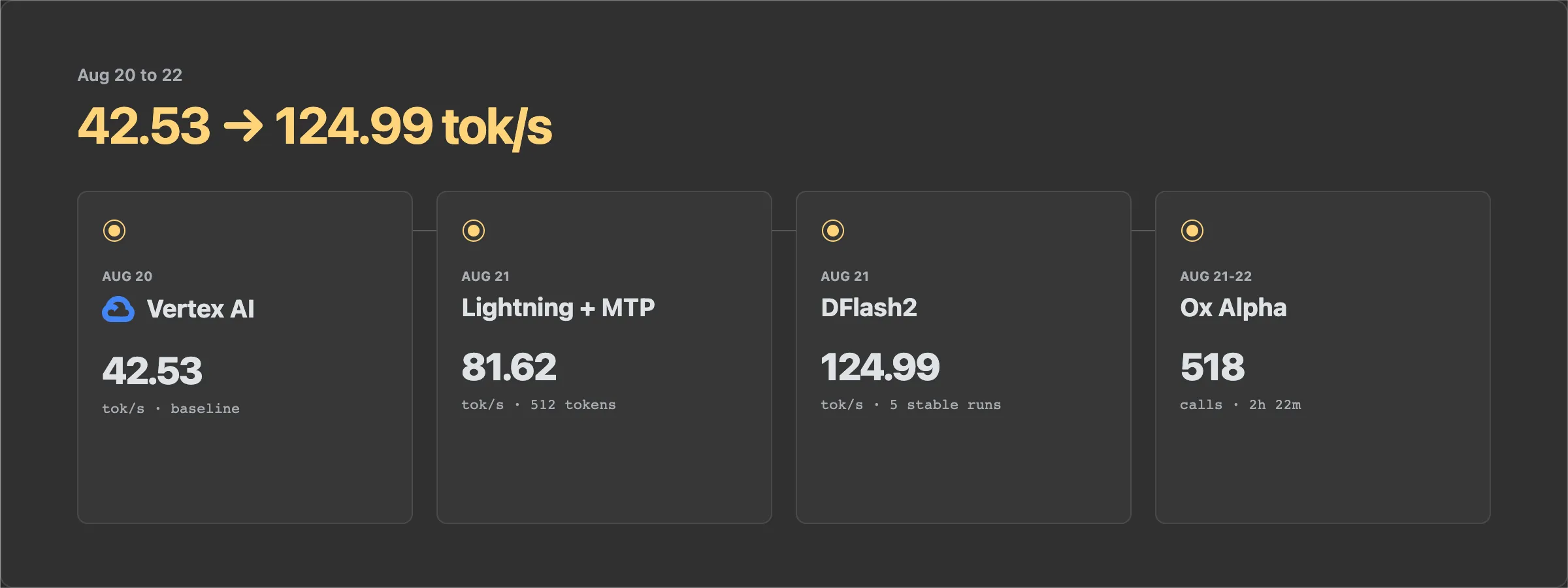
timeline
| Date | What happened | What I learned |
|---|---|---|
| Aug 20 | Got Qwen3.8 27B FP8 running on Google Vertex AI | The model worked, but getting GPU capacity was the first boss fight. Baseline generation was 42.53 tok/s. |
| Aug 21 | Moved experiments to Lightning AI | Lightning was much easier for iteration. Plain vLLM measured 44.29 tok/s and MTP reached 81.62 tok/s on the longer test. |
| Aug 21 | Added the DFlash2 draft model | Median generation reached 124.99 tok/s. That was 53% above my MTP profile, but the KV format also changed. |
| Aug 21-22 | Used the model to investigate Ox Alpha | It stayed on task across hundreds of tool calls and long, repetitive agent contexts. |
| Aug 22 | Rebuilt the stack on Verda and ran a proper matrix | DFlash7 with FP8 KV cache became the balanced configuration. DFlash9 was faster, but not enough to pass my promotion threshold. |
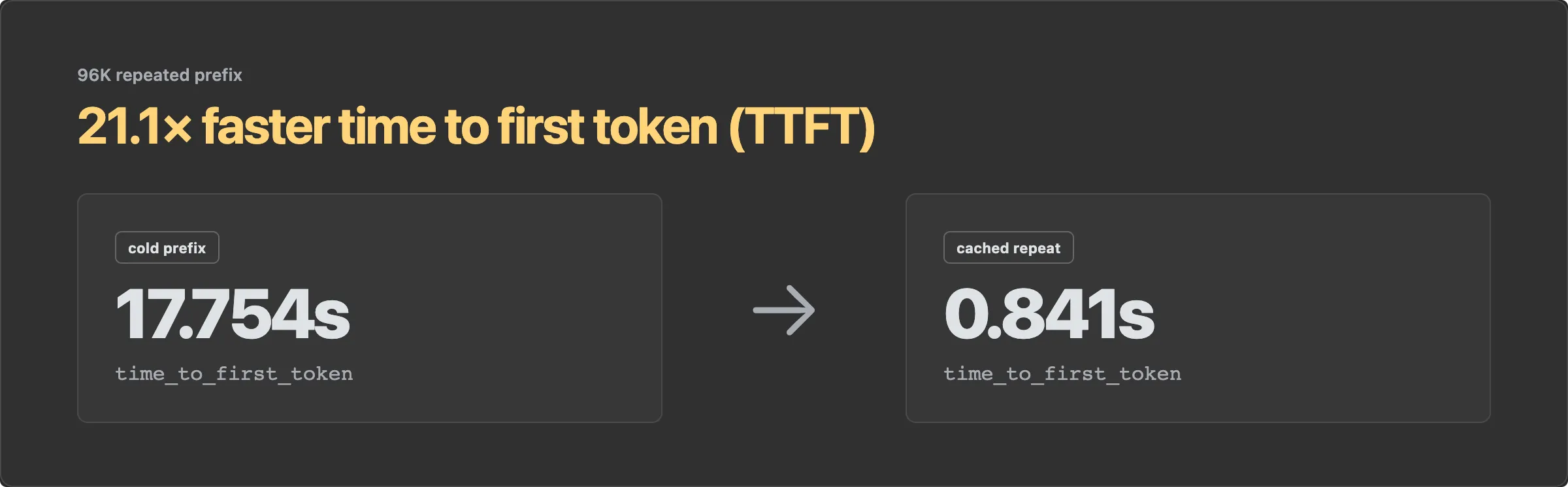
| Aug 22 | Tested memory limits and prefix caching | A repeated 96K prefix went from 17.754 seconds to first token down to 0.841 seconds. A 48 GB deployment looked viable around 214K context, not the full 262K. |
Why I wanted a model without policy brakes
I was tired of prompt gymnastics
I am a security engineer. A lot of my job is security testing, pentesting, and generally poking around systems until I understand how they work. If I already have a job to do, spending the first twenty minutes convincing a model that the job is okay makes no sense to me.
I had also been hearing a lot about Qwen3.8 27B. It is a dense 27B model, small enough that I could rent one GPU and run it myself. Qwen’s model card also showed strong coding and agentic results, which was enough to make me curious.
I did not treat the Opus 4.6 Max columns as a clean head-to-head comparison. Qwen notes that the Opus SWE-bench Pro number is the officially reported score, while the other models were rerun on a refined benchmark. QwenSWEBench is also an in-house benchmark. The table was a reason to test the model on my own work, not proof that a 27B download matched Opus across tasks.
Ox Alpha became that real workload. The investigation needed an agent that could make requests, inspect responses, write probes, run scripts, discard bad hypotheses, and keep going. I did not want it to stop every twenty minutes and ask whether model fingerprinting was polite.
So I rented a GPU and gave an uncensored model a terminal.
The difference was simple.
Not because it said edgy things. I do not care about that. It behaved like a tool. I gave it the investigation, and it got on with the work. No refusal loop. No moral lecture. No prompt gymnastics.
The model had fewer policy brakes. My infrastructure still had plenty. It ran inside a scoped environment, with deliberate permissions, logs, checkpoints, and a human reviewing what it did. This is also why I built AgentJail. The execution boundary decides what the agent can touch, and the model spends its tokens solving the problem.
Picking the model
It was not just “find the least censored one”
There are plenty of models with “uncensored” in the name. That tells me almost nothing about whether I would want one driving tools for hours.
The real question was whether removing refusals also damaged the model’s useful capabilities. An abliterated model that never refuses but becomes noticeably worse at reasoning is not a win. It is just a more agreeable bad model.
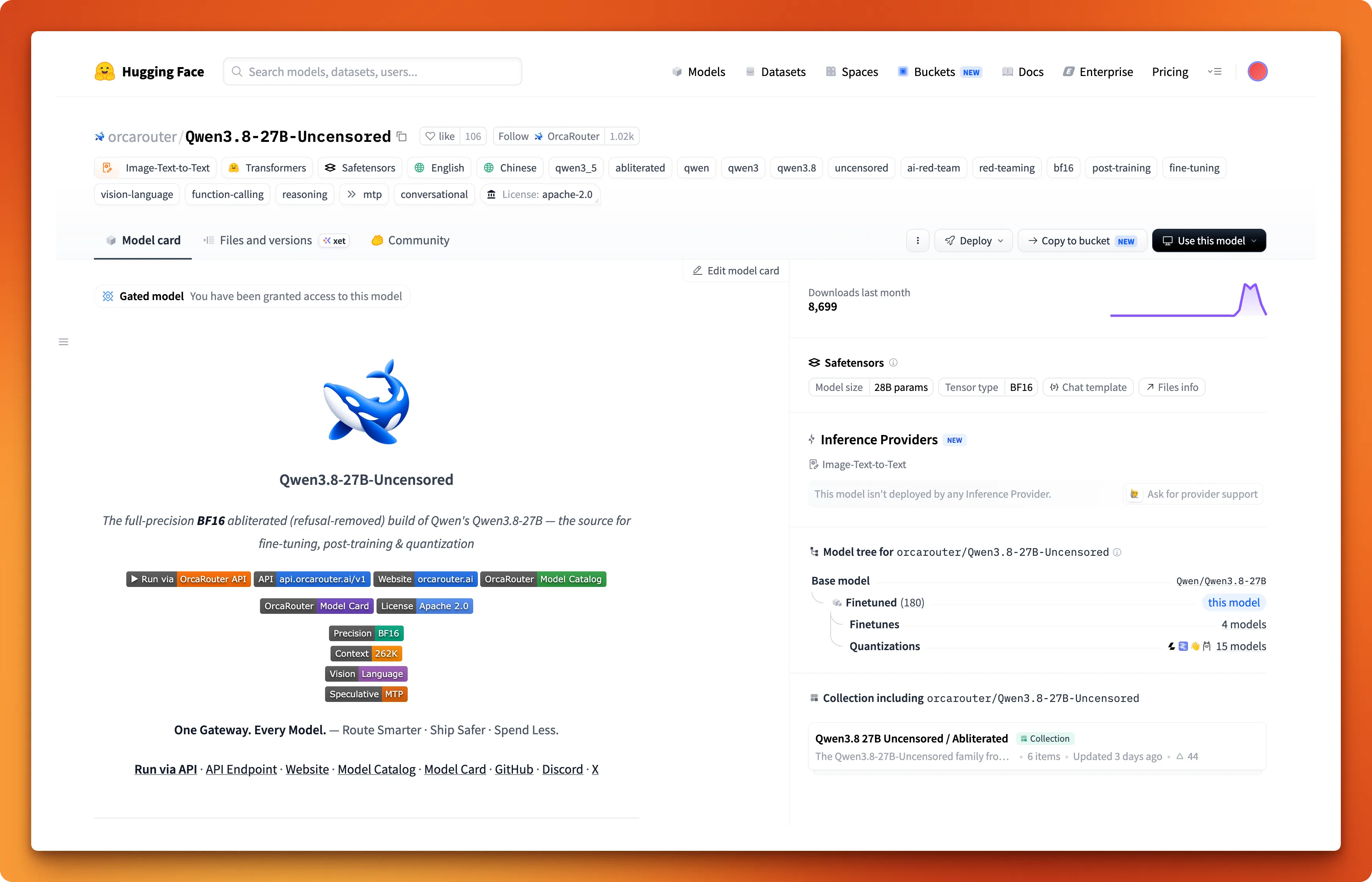
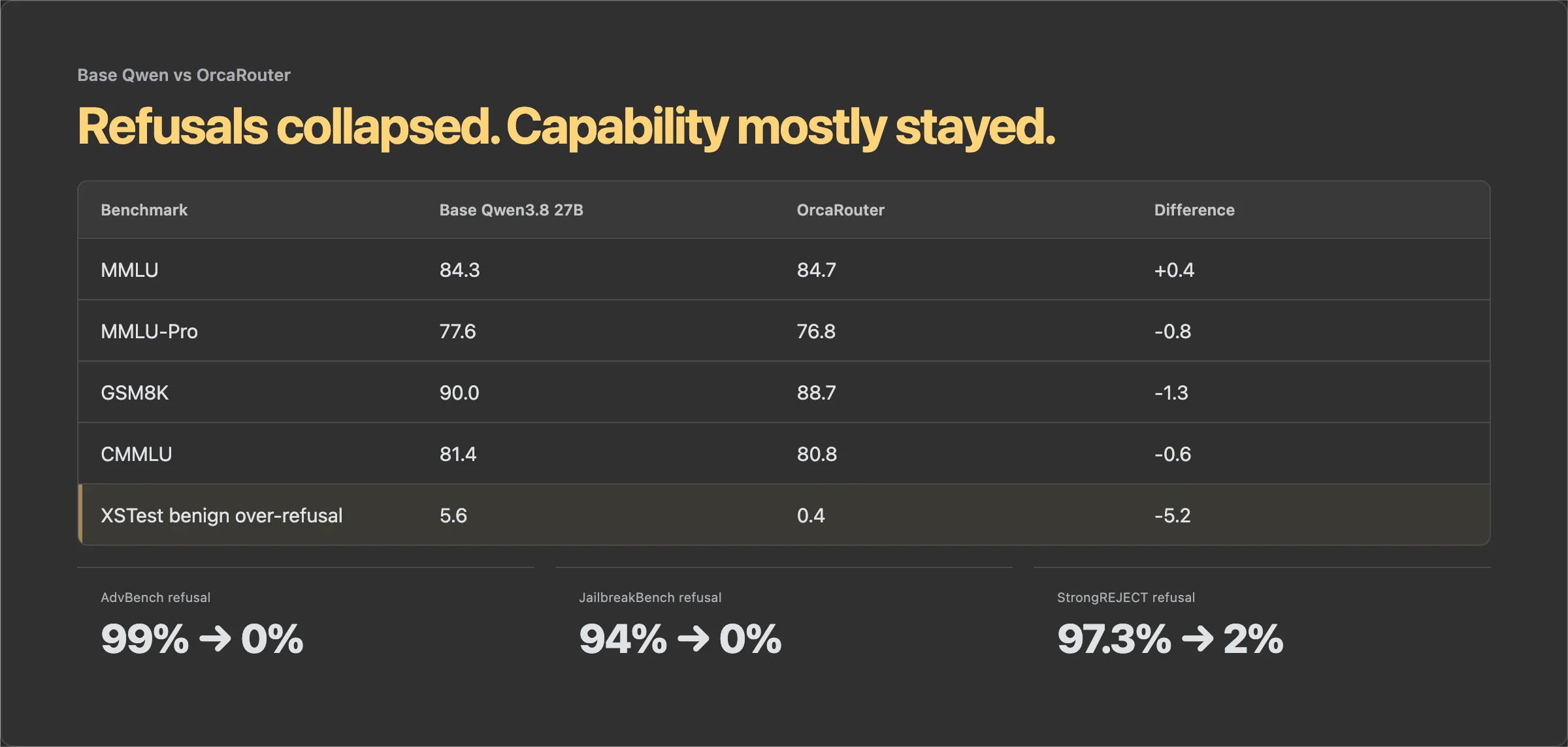
I looked at an LDA-based checkpoint that presented itself as the cleaner intervention. I eventually chose OrcaRouter’s version because it published the evidence I cared about. Its method removed a measured refusal direction from the model, and its capability scores stayed close to the base Qwen3.8 27B.
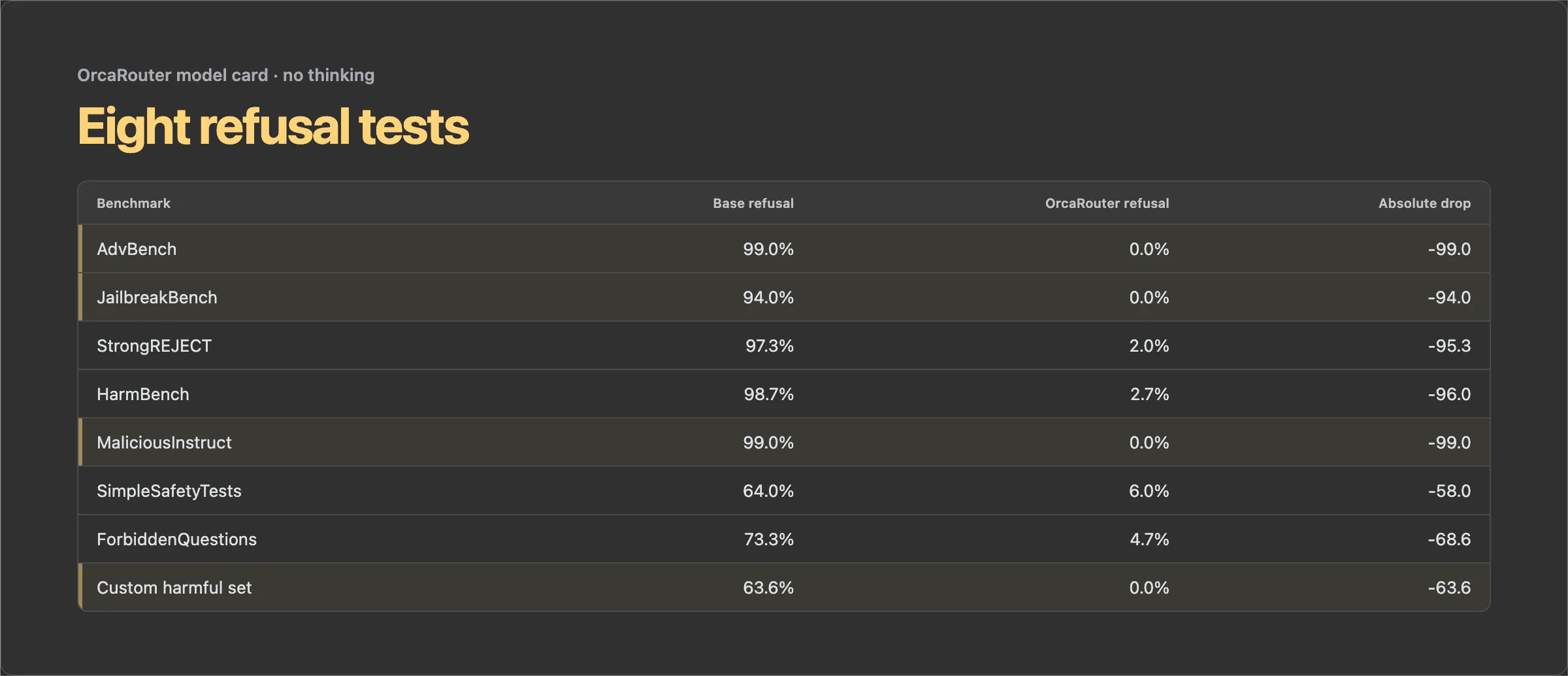
The refusal benchmarks moved much more dramatically. The published no-thinking refusal rate fell from 99% to 0% on AdvBench, from 94% to 0% on JailbreakBench, and from 97.3% to 2% on StrongREJECT.
That was the trade I wanted. Refusal behavior changed sharply. The general benchmarks remained within 1.3 points of the base model, with MMLU actually moving up by 0.4. My own tool-calling probes also kept working after the modification.
This is not proof that usability never decreases. Four benchmarks and a few tool probes cannot establish that. It was enough evidence to prefer this checkpoint for an experiment, and much better than choosing whichever model card used the word “uncensored” the most times.
✏️ Before publishing: add the exact LDA checkpoint name and link from my model-selection notes.
Getting it running
Why a 96 GB RTX PRO 6000?
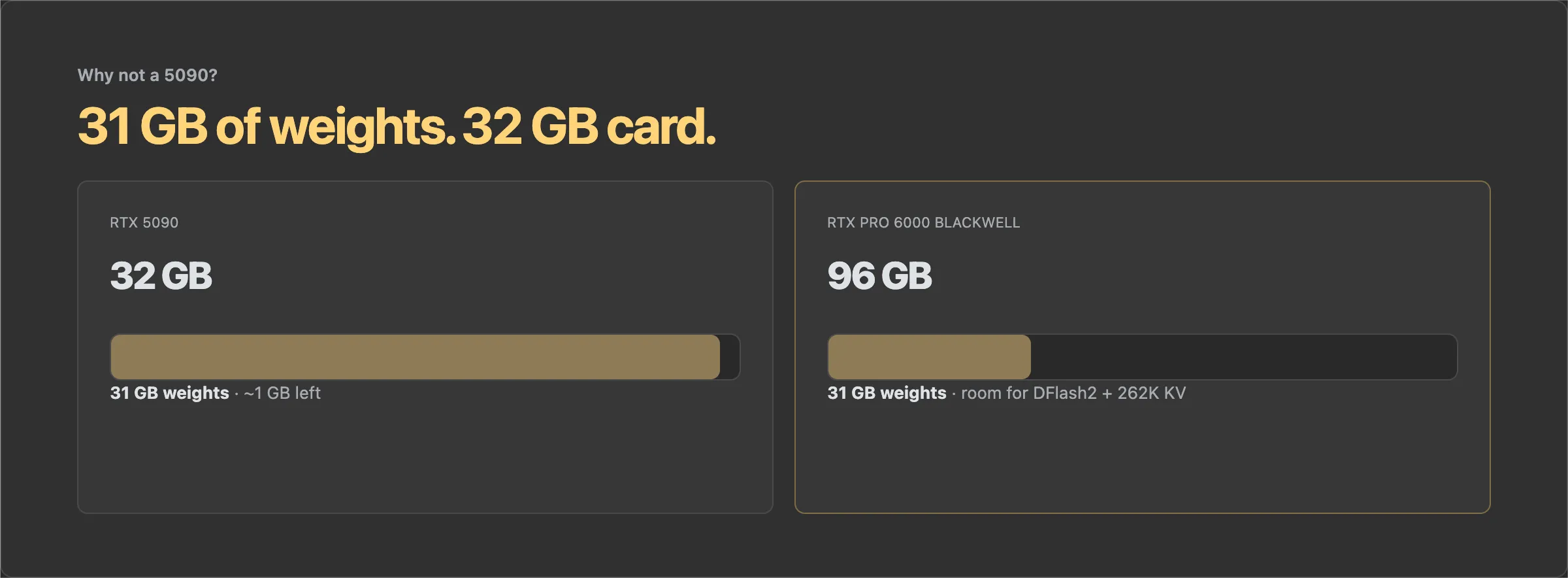
My first instinct was an RTX 5090. It is fast, widely available, and its Blackwell support makes NVFP4 an obvious option. There was only one problem: I did not want to start by squeezing the model into four-bit weights.
The quantization names here are FP8 and NVFP4, not BF8 and BF4. I kept mixing those up in my notes.
The FP8 checkpoint is roughly 31 GB just for the model. A 32 GB RTX 5090 can technically sit very close to that number, but that leaves no practical room for a useful KV cache, CUDA graphs, activations, or the DFlash2 draft model. NVFP4 would give the 5090 room to breathe, but it would also change the experiment.
I wanted:
- the FP8 checkpoint instead of a more aggressive four-bit quantization
- one GPU instead of splitting inference across two consumer cards over PCIe
- the full 262,144-token context configuration
- enough memory for CUDA graphs, a large KV cache, and a separate DFlash2 draft model
- enough headroom to measure first and optimize later
The RTX PRO 6000 Blackwell gave me 96 GB of VRAM and removed memory as the immediate problem.
I did not run a controlled FP8 versus NVFP4 quality or speed comparison. I cannot honestly attach a percentage to that choice. NVFP4 could be an excellent deployment format, especially on a 5090. My decision was about preserving the less aggressive checkpoint and buying enough headroom for long-context agent workloads, not about a benchmark I never ran.
Google Cloud made acquiring one GPU feel like distributed systems research
I started on Google Vertex AI with a g4-standard-48 machine and one RTX PRO 6000 Blackwell.
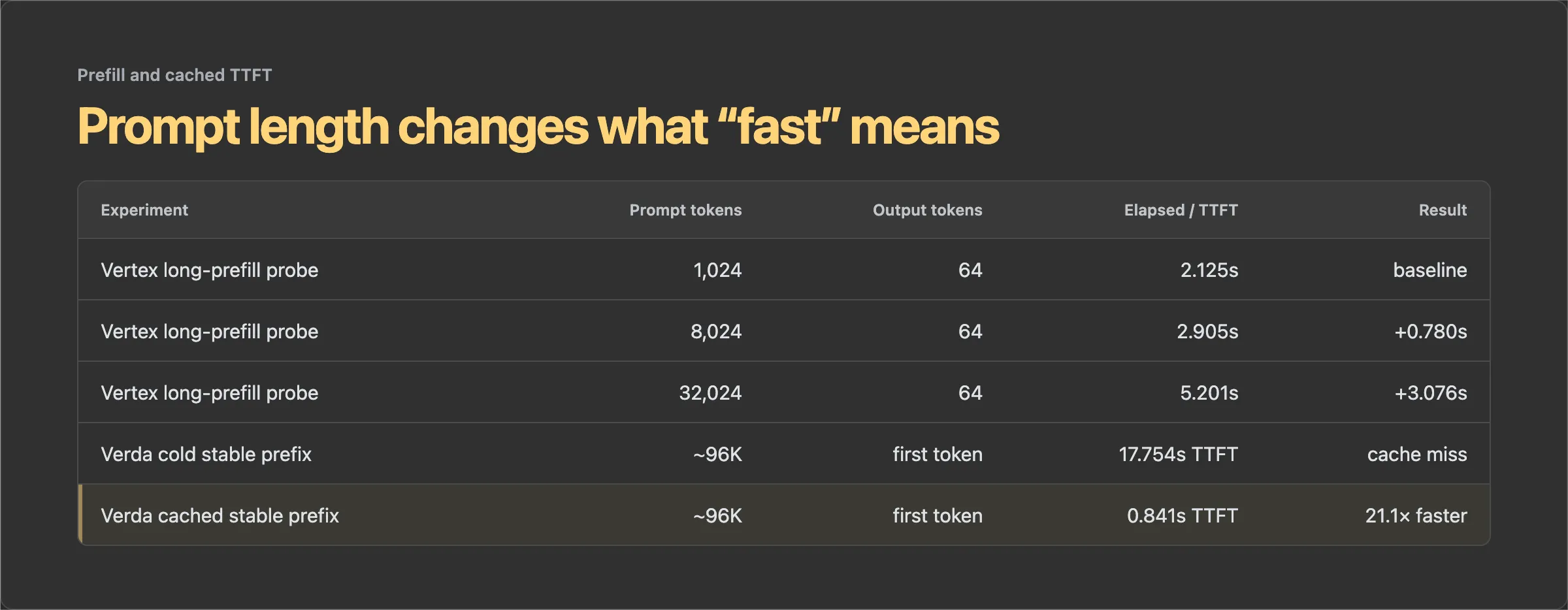
Once it existed, it was fine. The good deployments became ready in 11 minutes 50 seconds and 12 minutes 50 seconds. Plain Qwen inference produced a median 42.53 output tokens/second. Image input worked. Video input worked. OpenCode could send an image successfully. Long prefill behaved sensibly as I moved from roughly 1K to 8K to 32K input tokens.
Getting there was shitty.
Capacity was unreliable, and one cold or failed allocation cycle consumed about 31 minutes before I had anything useful. I spent an unreasonable amount of time asking a cloud provider whether I was allowed to pay it for one GPU.
It was also the expensive option in this comparison. I estimated the managed Vertex setup at $2.59/hour, including the management overhead, or $10.35 for four hours.
Lightning AI was where the optimization loop got fast
Lightning advertised 80 free GPU hours to start. That headline is easy to misread as 80 hours on whichever GPU you want. It is a T4-equivalent credit headline, not 80 hours on an RTX PRO 6000. Lightning’s hardware table lists 2 free RTX PRO 6000 hours per month under the current allowance.
That was enough for my optimization loop. I did not preserve the account billing breakdown, so I cannot support a more precise personal free-runtime number than that.
Lightning gave me a much quicker edit, launch, benchmark, kill loop. I could stop theorizing about serving configurations and collect numbers.
The plain vLLM baseline on an 80-token controlled test was 44.29 tok/s. Then I enabled MTP.
Speed and reliability optimization
First MTP, then DFlash2
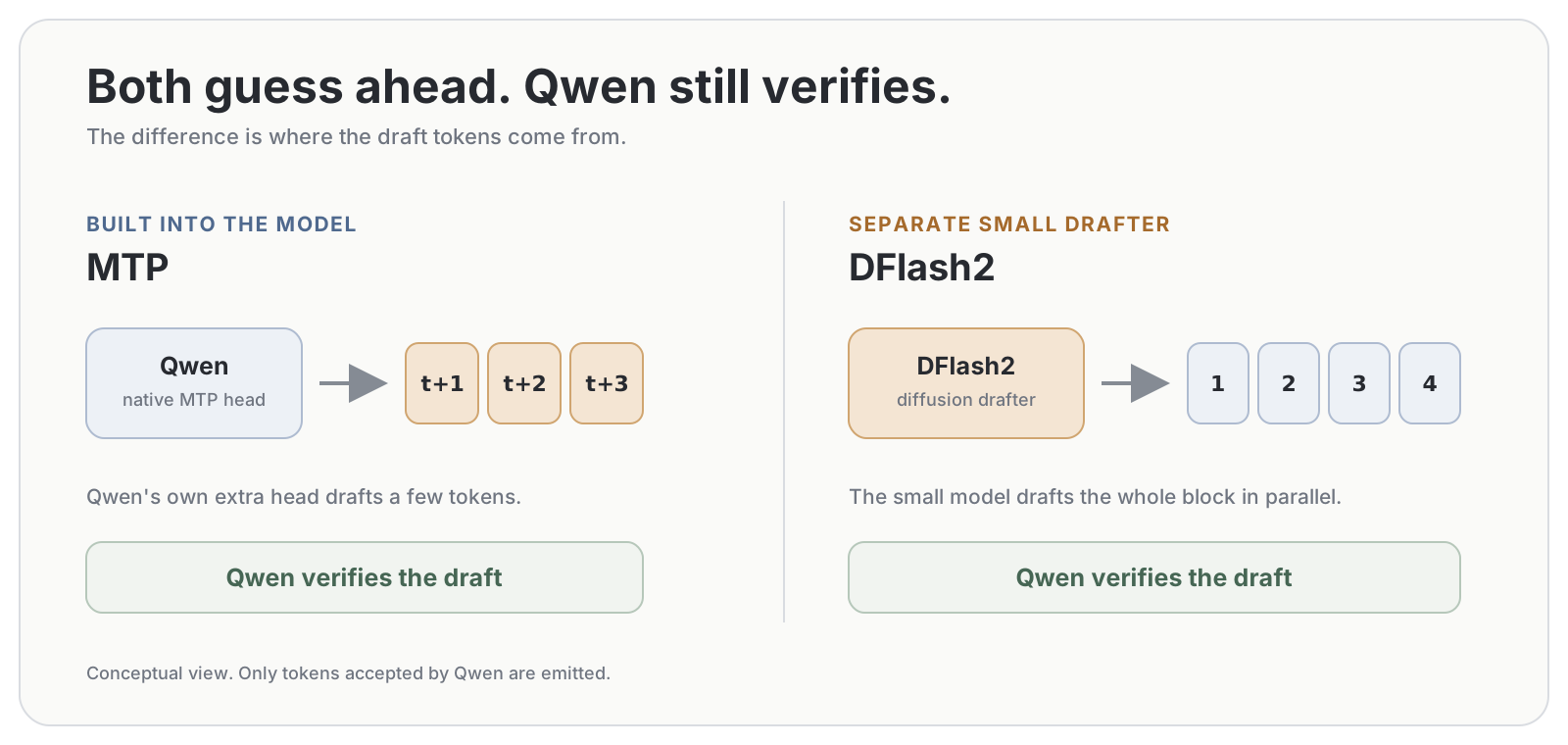
MTP primer: normal decoding produces one token at a time. MTP uses Qwen’s own prediction head to draft a few tokens ahead, then Qwen verifies them together.
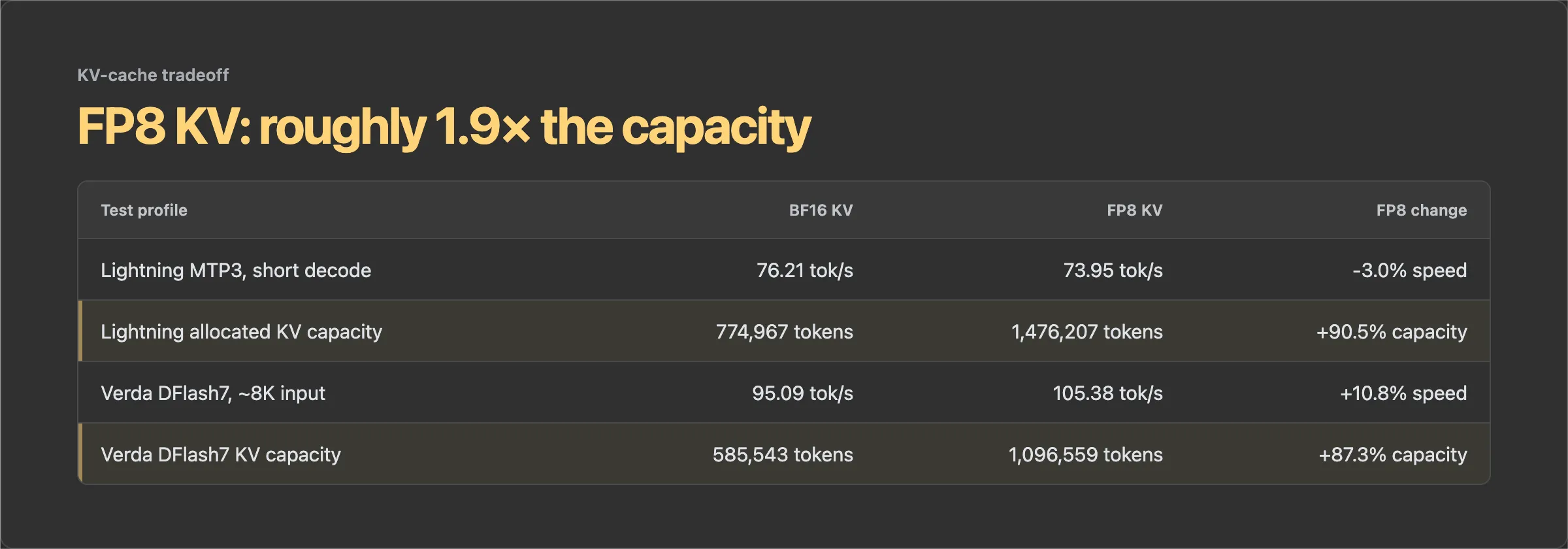
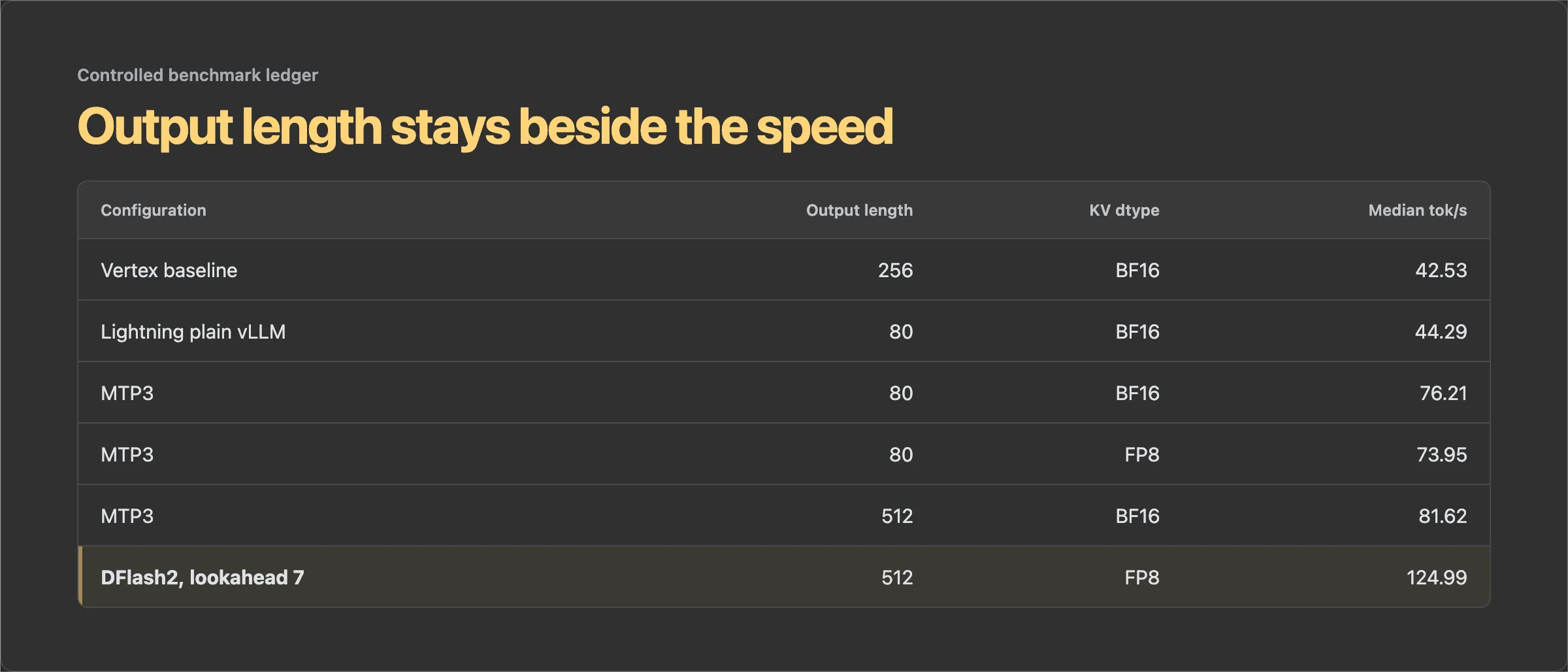
With MTP3 and BF16 KV cache, the short controlled test rose from 44.29 to 76.21 tok/s, a 72.1% improvement. FP8 KV cache measured 73.95 tok/s on that same test, while almost doubling allocated cache capacity from 774,967 to 1,476,207 tokens.
DFlash2 primer: it uses the same draft-and-verify trick, but a separate small diffusion model proposes a whole block of tokens in parallel before Qwen checks it.
The next comparison used 512 generated tokens in both profiles:
| Configuration | Median output tok/s | Mean output tok/s | Change |
|---|---|---|---|
| MTP3 | 81.62 | 73.05 | baseline |
| DFlash2, lookahead 7 | 124.99 | 124.82 | +53.1% observed |
That +53.1% is not DFlash2’s isolated speedup. The MTP profile used BF16 KV cache, while the DFlash2 profile used FP8 KV cache, and I collected them at different stages of the experiment. Output length matched, but this was still a comparison between two serving profiles, not a one-variable A/B test.
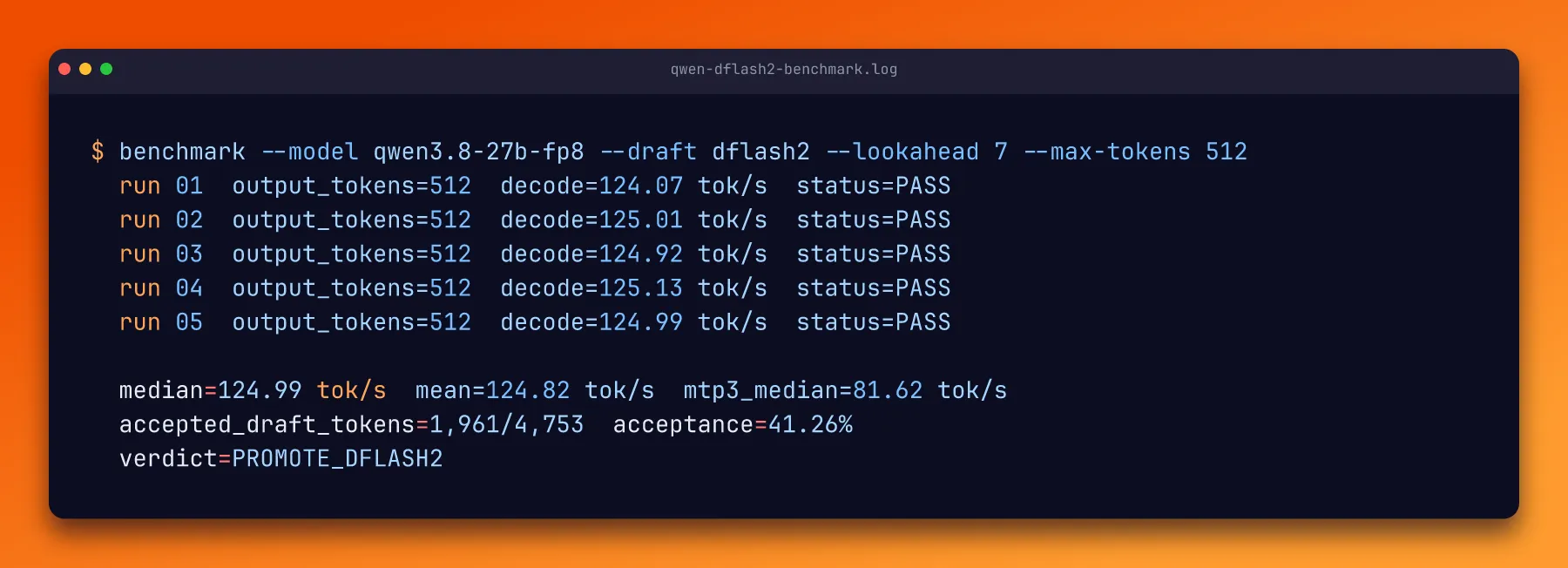
The MTP runs were noisy: 62.85, 82.20, 82.23, 56.34, and 81.62 tok/s. DFlash2 was boring in exactly the way I like benchmarks to be: 124.07, 125.01, 124.92, 125.13, and 124.99 tok/s.
I used incoai/Qwen3.8-27B-DFlash2 as the drafter. At lookahead 7, Qwen accepted 1,961 of its 4,753 proposed draft tokens in the controlled run, an acceptance rate of 41.26%.
The underlying idea comes from the paper DFlash: Block Diffusion for Flash Speculative Decoding. Instead of drafting the next tokens one by one, a small block-diffusion model proposes a whole block in parallel. The target model then verifies the proposals, so the speedup does not require trusting the smaller model’s answer.
DFlash2 adds local convolutions and a candidate-path selector on top of that design. The details are in the DFlash2 model card and the vLLM implementation PR that I pinned for these runs. The paper’s published benchmarks used different GPUs, models, and workloads, so I kept its numbers separate from my 124.99 tok/s measurement.
It still beat MTP comfortably.
Then I tried to optimize the optimization
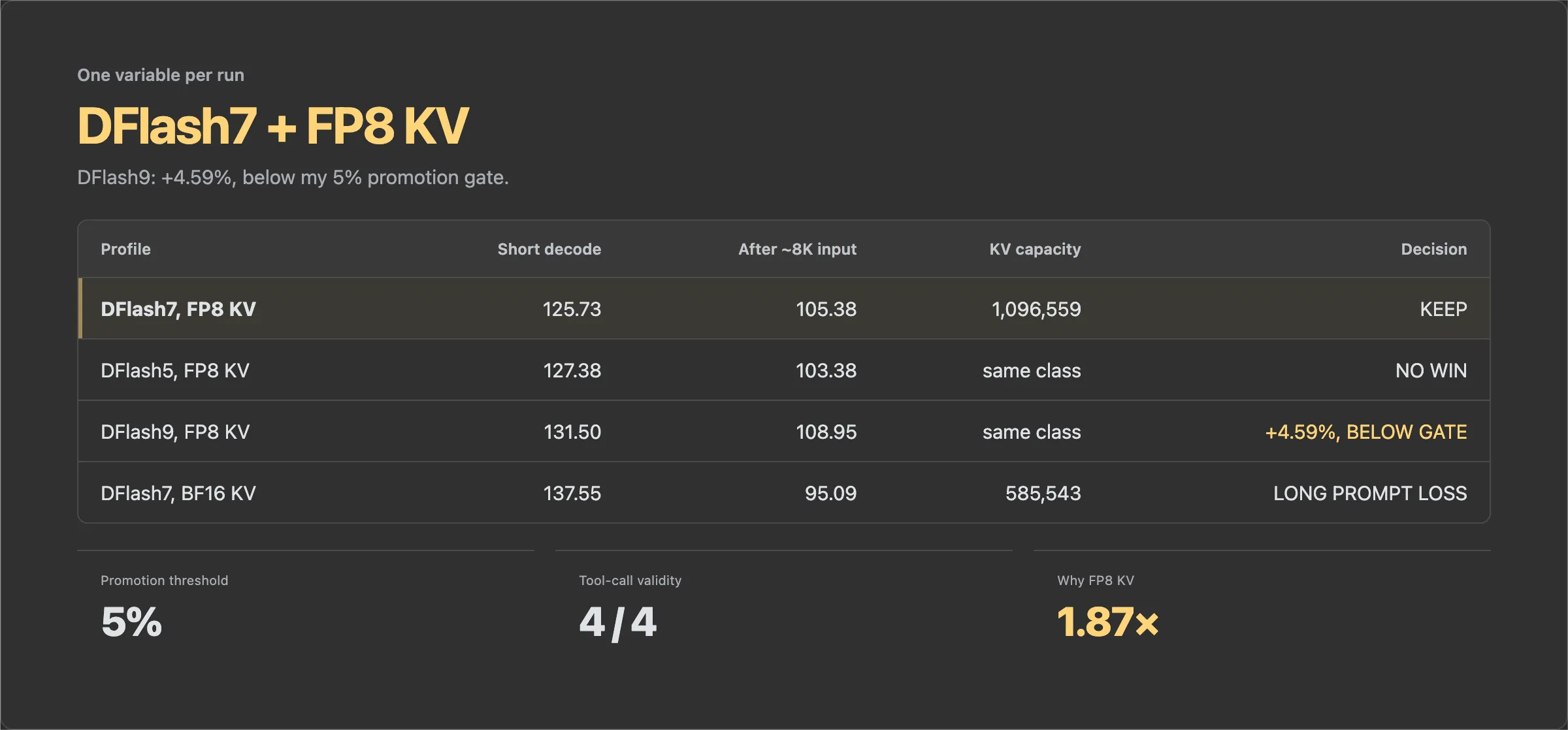
Once the stack was stable on Verda, I tested whether a larger or smaller DFlash lookahead was better and whether BF16 KV cache was worth its memory cost.
| Configuration | Short decode | Decode after about 8K input | Allocated KV capacity |
|---|---|---|---|
| DFlash7, FP8 KV, warm repeat | 125.73 tok/s | 105.38 tok/s | 1,096,559 tokens |
| DFlash5, FP8 KV | 127.38 tok/s | 103.38 tok/s | not materially better |
| DFlash9, FP8 KV | 131.50 tok/s | 108.95 tok/s | same profile class |
| DFlash7, BF16 KV | 137.55 tok/s | 95.09 tok/s | 585,543 tokens |
DFlash9 was faster than the warm DFlash7 repeat by 4.59% on the short test and 3.39% after roughly 8K input. I had set a 5% promotion threshold in advance, so I did not promote it. Tiny benchmark wins have a habit of disappearing in real workloads.
BF16 KV cache was 9.40% faster on the short test, then 9.76% slower after the longer prompt. It also cut cache capacity almost in half. Agent workloads repeatedly replay large contexts, so FP8 KV was the better overall choice.
The quality probes stayed valid across all four profiles. Every configuration produced a valid tool call. DFlash9 matched all five reference outputs; DFlash5 and BF16 KV matched four of five, with the remaining answers still semantically correct. That is a smoke test, not a complete quality evaluation, but it caught no reason to abandon the faster setup.
Prefix caching mattered more than another tiny decode win
Agent loops are weird inference workloads. They do not send a brand-new prompt on every turn. They send the same system prompt, the same tool definitions, and an increasingly large conversation prefix over and over again.
That makes time to first token just as important as decode speed.
With a stable prefix of about 96K tokens, my first request took 17.754 seconds to reach the first token. The cached repeat took 0.841 seconds. vLLM reported 93,936 cached prompt tokens.
That is a 21x improvement in time to first token for the repeated prefix. It does not increase output tokens per second. It removes the repeated prefill work that makes a long-running agent feel dead between tool calls.
Memory optimization
I logged everything because I wanted to know how much GPU I actually needed
The point of the 96 GB card was not to declare that every 27B model needs 96 GB. It was to stop fighting OOM errors long enough to measure the system properly.
I checkpointed each configuration and recorded model load, reserved KV cache, process VRAM, host RAM, launch time, short decode, long prefill, tool validity, and prefix-cache behavior. DFlash2 settled around 88,519 MiB of process VRAM and peaked at 89,591 MiB in the full 90% memory profile.
That number initially makes the card look mandatory. It is not.
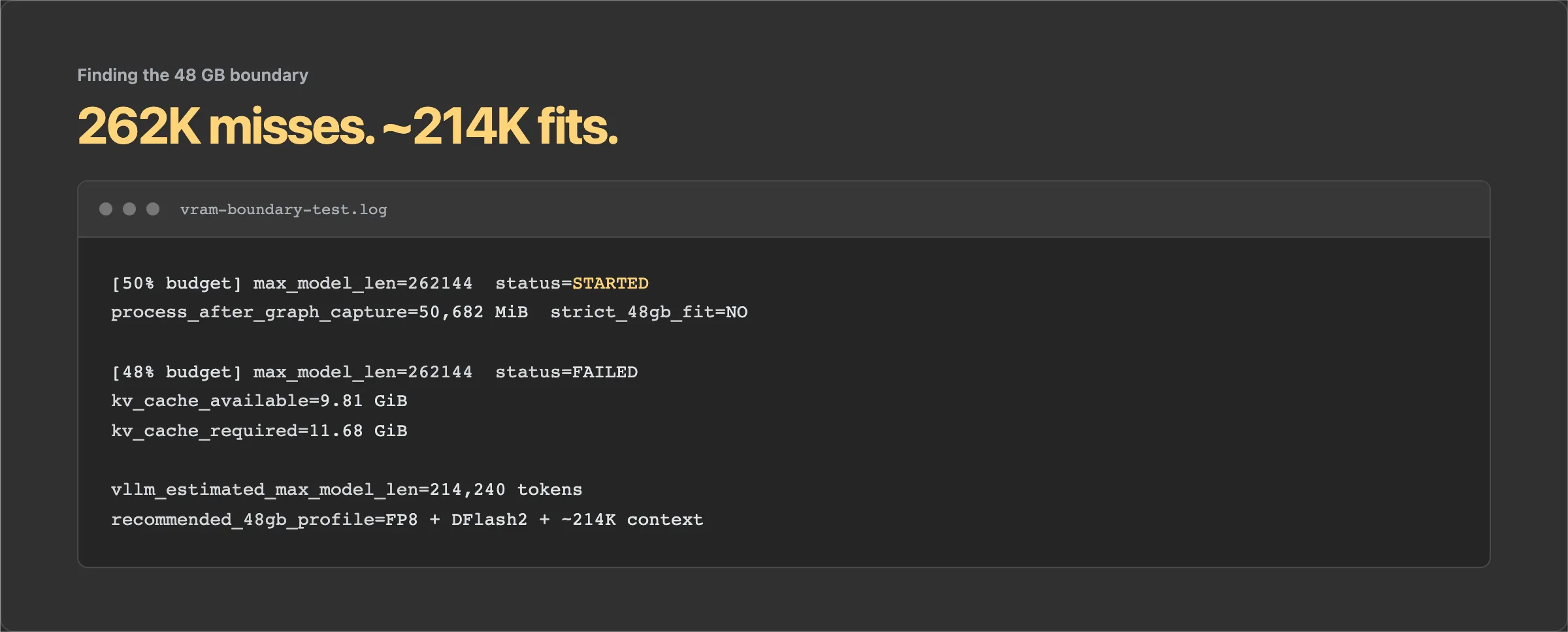
vLLM reserves the memory it is allowed to use for KV cache. Reserved memory is not the same as the active memory required by my workload. When I forced a smaller budget, the real boundary became visible:
| Test | Result |
|---|---|
| 50% of the 96 GB card, 262K max context | Server started, but settled at 50,682 MiB after graph capture. Too large for a strict 48 GB card. |
| 48% budget, 262K max context | Failed. vLLM had 9.81 GiB available for KV cache and needed 11.68 GiB. |
| vLLM’s estimated context at that boundary | About 214,240 tokens. |
So the honest answer is slightly less satisfying than “it fits in 48 GB.”
The model, DFlash2, and a still-ridiculous roughly 214K context window should be deployable on a 48 GB card with the measured settings adjusted. The exact 262K configuration needs a little more than 48 GB, or another memory optimization that I have not validated yet.
This is why I kept the telemetry. Without it, I would look at a process consuming nearly 90 GB and assume I needed the full card. With it, I can separate convenient reservation from actual deployment requirements.
The real workload: Ox Alpha
Synthetic prompts are useful for tuning. They do not tell me whether the model can operate as an agent for two hours without becoming useless.
I ran the uncensored Qwen model as the autonomous build agent behind my Ox Alpha identification work. That investigation became the Ox Alpha post. The model wrote and executed probe scripts, inspected raw responses, compared model families, tested tokenizer behavior, pushed context limits, and kept notes as the evidence changed.
The public evidence repository contains 29 wave scripts, about 300 calls to Ox Alpha, roughly 250 identity probes, 183 raw captures, 64 cross-probed models, and 19 long-context probes. That autonomous track alone sent about 5.1 million prompt tokens to the mystery endpoint.
On the orchestration side, OpenCode and Pi produced a larger logical-token count because every agent turn resent a growing context:
| Client | Runtime | Model calls | Logical input tokens | API-billed completion tokens |
|---|---|---|---|---|
| OpenCode | 2h 10m 39s | 216 | 27,032,870 | 274,154 |
| Pi | 2h 16m 41s | 302 | 33,784,279 | 167,352 |
| Combined overlapping span | 2h 22m 28s | 518 | 60,817,149 | 441,506 |
That 60.8 million figure is logical input processed across requests. It does not mean I wrote 60.8 million unique tokens, and it does not mean the model generated that many tokens. Long agent contexts are repeatedly sent back to the server. Prefix caching is what stops that pattern from becoming completely absurd.
The endpoint I was probing was free. The GPU was running Qwen as the orchestrator, not serving Ox Alpha itself.
More importantly, the model did the job. It did not waste the run debating the legitimacy of every probe. It followed a long investigation, used tools reliably, and left a usable evidence trail.
It was also wrong sometimes. The autonomous analysis initially leaned toward GLM-4. Human review of the fuller evidence changed the conclusion to the GLM-5 generation. Removing refusals did not remove the need to check its work.
That is the bargain I actually want. Give me a model that will attempt the task, plus enough telemetry and evidence that I can catch it being confidently wrong.
Cost optimization
Verda was where I finally stopped thinking about cloud capacity.
It had the GPU. I clicked the GPU. The GPU appeared. This should not have felt novel after Google Cloud, but it did.
Verda listed the RTX PRO 6000 at $0.945/hour spot pricing. The billing page recorded 1 hour 30 minutes 5 seconds and $1.42 in instance charges. That is the number I am using here.
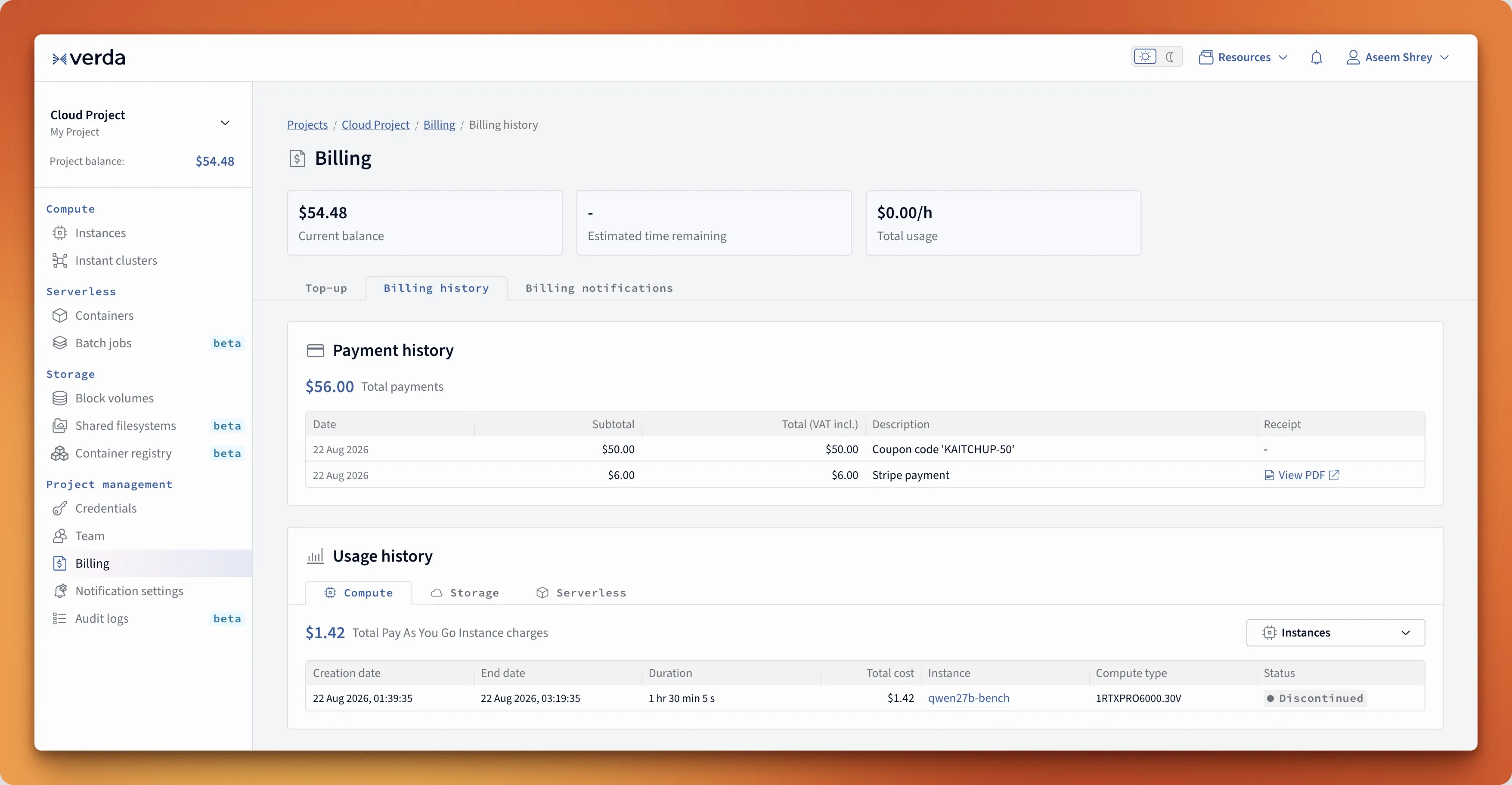
Coupon code KAITCHUP-50 gives new Verda users $50 in free credit.
What I would deploy today
Other serving projects I considered
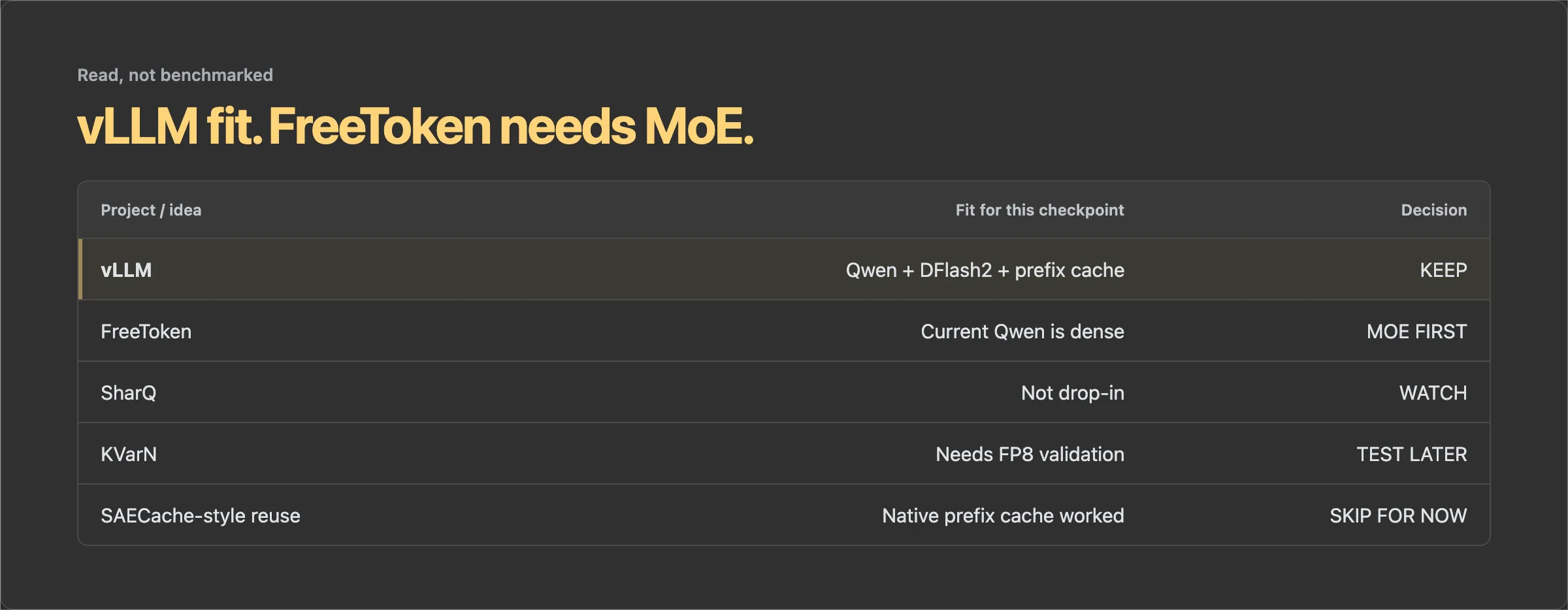
FreeToken needs an MoE to do the interesting thing
One promising project I read but did not try was FreeToken. Its arXiv paper describes an edge-native serving system built mainly around sparse mixture-of-experts models.
The clever bit is the memory layout. The full expert pool can live in host RAM. Frequently used experts are cached in VRAM, and FreeToken can divide the remaining GPU memory between that expert cache and the KV cache. That is how it can run models much larger than the GPU itself on consumer hardware.
My OrcaRouter checkpoint inherits Qwen3.8-27B’s dense architecture. Every feed-forward block participates in every token. There is no sparse pool of inactive experts to leave in system RAM. FreeToken’s own model docs say dense models resolve to its fused backend, so I would not get the expert-offload advantage that made the project interesting to me.
| Design | What sits in host RAM | What needs VRAM | My status |
|---|---|---|---|
| Dense Qwen3.8 + vLLM | No expert pool to offload | Dense FP8 weights, DFlash2, and KV cache | Tested end to end |
| Sparse MoE + FreeToken | Full expert pool | Hot experts and KV cache | Promising, but not applicable to this checkpoint |
| MoE + FreeToken + KV tiering | Full experts and colder KV pages | Hot experts and active KV pages | Future combination, not built or tested |
The tempting future experiment is to turn this into a sparse MoE and then use FreeToken on a smaller card. But that is not a flag or a clever safetensors split. Somebody would need to train or upcycle a proper MoE checkpoint, then validate that its quality, uncensored behavior, and tool use survived.
FreeToken handles the expert-offload side. If I also want to keep colder KV-cache pages in system RAM, I would need a separate KV-tiering mechanism. Put those two together and it could be a very good setup for long agent contexts on smaller GPUs. For now, it is an idea I looked into, not a benchmark result.
I also read through SharQ, KVarN, ZipServ, and SAECache-style approaches. Some may become useful, particularly for Blackwell or cache reuse, but none gave me a better validated configuration for this exact model than the boring answer: use vLLM, enable native prefix caching, add the DFlash2 draft model, and measure the workload I actually have.
I did not benchmark all of those engines. “Looked at” is not the same as “tested and rejected.”
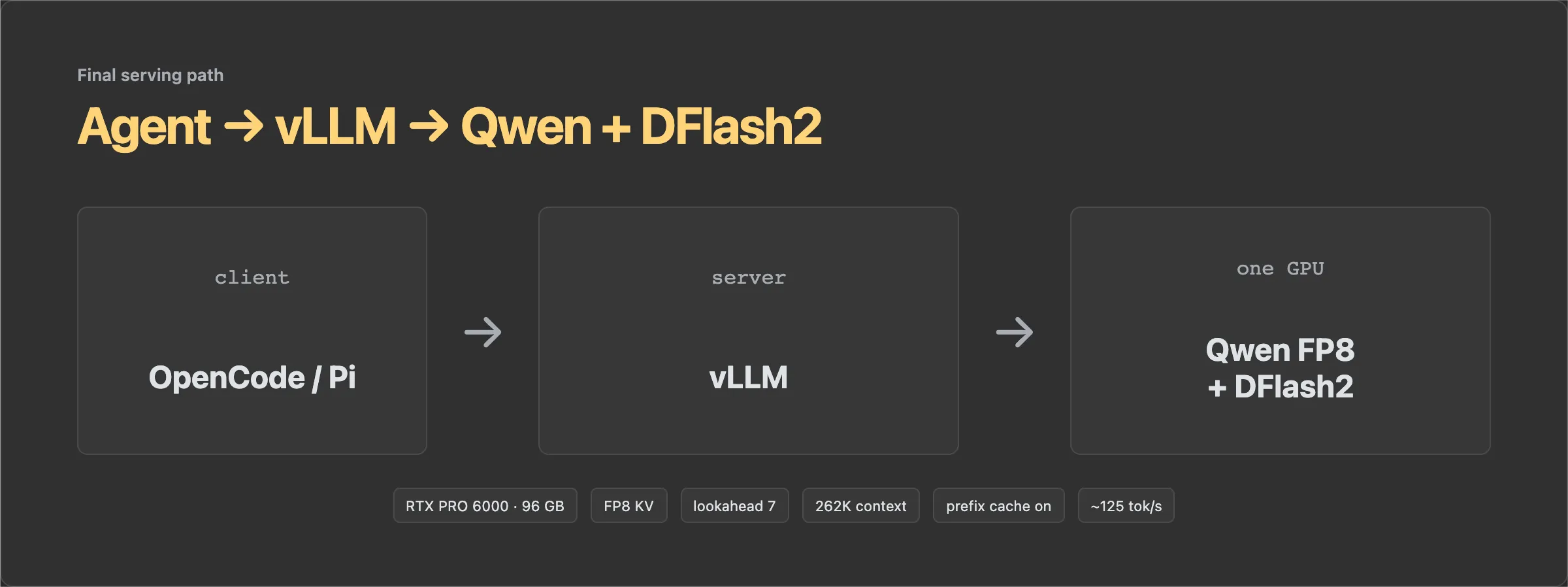
The configuration I would use today
| Part | Choice |
|---|---|
| GPU | 1x RTX PRO 6000 Blackwell, 96 GB |
| Main model | orcarouter/Qwen3.8-27B-Uncensored-FP8 |
| Draft model | incoai/Qwen3.8-27B-DFlash2 |
| Speculative decoding | DFlash2, lookahead 7 |
| KV cache | FP8 |
| Maximum context | 262,144 tokens |
| GPU memory utilization | 0.90 |
| Maximum sequences | 256 |
| Prefix caching | enabled |
| Server | vLLM with an OpenAI-compatible endpoint |
Reproduce the final setup
The exact setup prompt is in the tl;dr. I am keeping it in the post because the deployment repository is private. No dead clone command, and no mystery script you cannot inspect.
The important parts are straightforward:
- Keep the Docker layers and model caches on persistent storage. Rebuilding a DFlash2 image and downloading two models every time a spot instance disappears gets old very quickly.
- Pin the vLLM build. I used commit
b389ac29465b33f9e9c534df221ea3c129e9793f, which contains DFlash2 PR 52816. - Save the full launch configuration for every run. The token speed is useless if I cannot later tell whether it used MTP, DFlash2, BF16 KV, or FP8 KV.
- Check the actual runtime before sending it real work.
The first model and image download will take a while. A warm cached launch took about two minutes. I checked the GPU, served model ID, and prefix-cache flag before sending work to it.
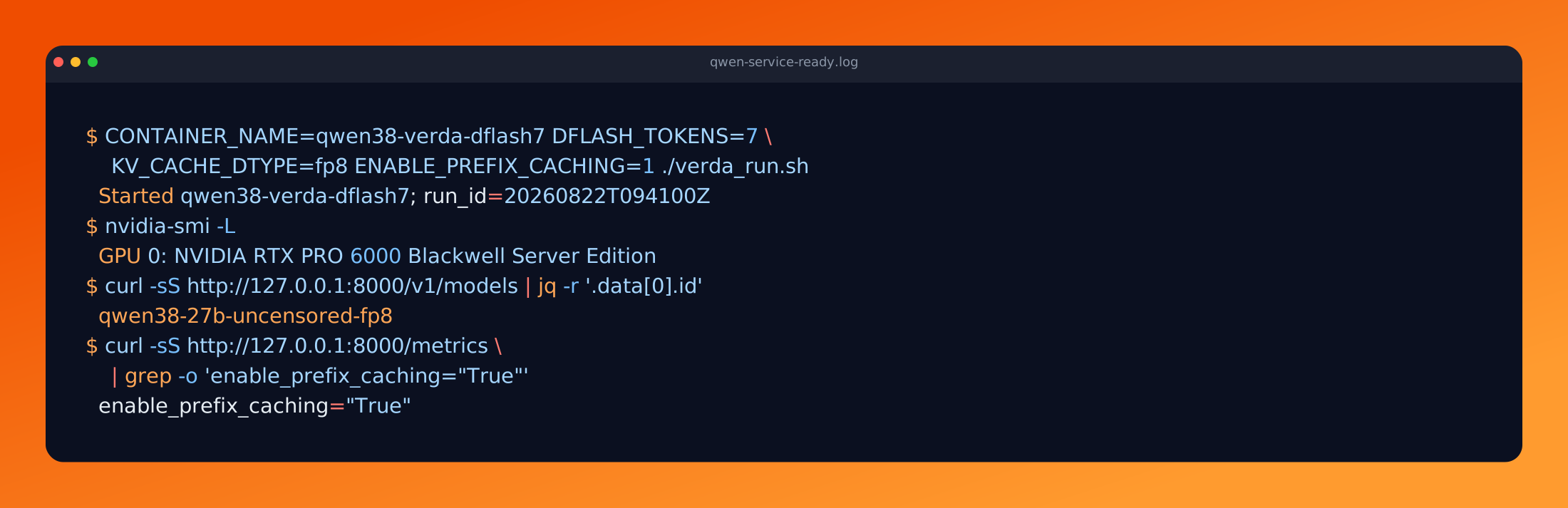
- Send a real prompt. Do not stop at
/v1/modelsand declare victory:
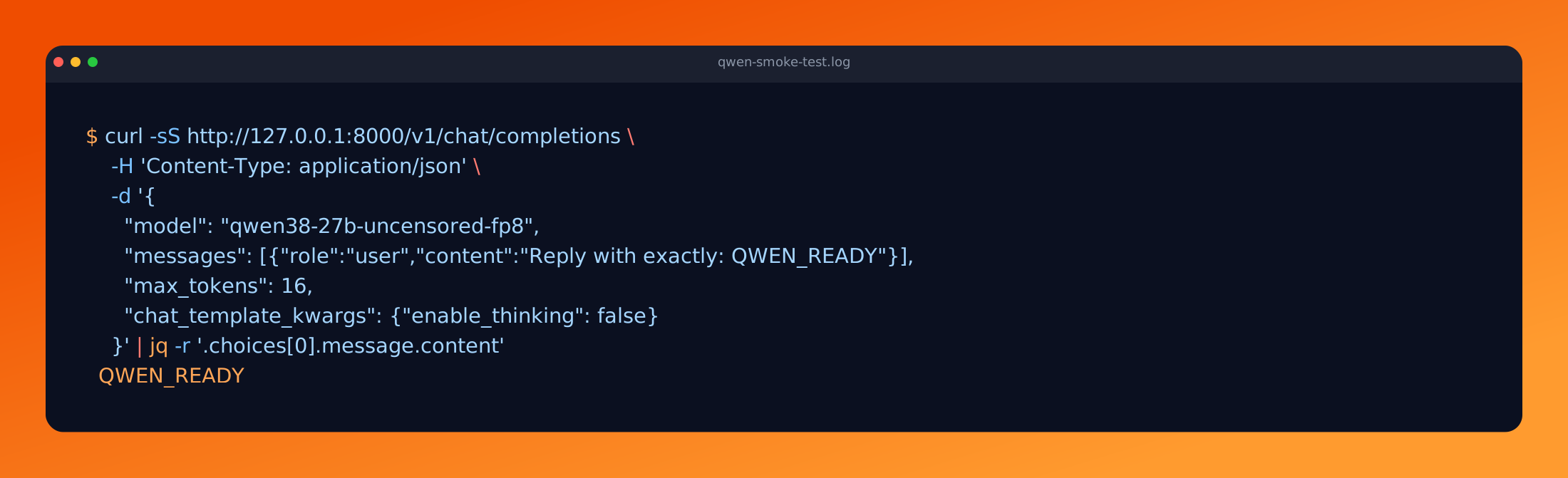
For OpenCode or Pi, tunnel port 8000 to the client and use the OpenAI-compatible base URL, API key local, and model ID qwen38-27b-uncensored-fp8. Keep the service bound to the rented machine and stop the GPU when the experiment is done. That last step is boring right until the billing email arrives :p
For a cheaper permanent deployment, I would next validate the same stack on a 48 GB card with the maximum context reduced to about 214K and a realistic concurrency limit. That is probably the price-performance sweet spot. The 96 GB card remains the zero-drama option when I want full context and room to experiment.
What I learned over those nights
I went into this wanting to run an uncensored model. I came out with far more notes about inference engineering than censorship.
- Start with headroom, then measure down. The 96 GB card removed memory pressure while I was experimenting. The measurements later showed that a 48 GB deployment should be possible around 214K context.
- Benchmark shape matters. An 80-token test and a 512-token test can both be useful, but pretending they are directly comparable creates nonsense numbers.
- The fastest row does not automatically win. DFlash9 was slightly faster, but it missed my 5% promotion gate. DFlash7 with FP8 KV was the more balanced configuration.
- Consistency matters as much as the peak. The five DFlash2 runs stayed between 124.07 and 125.13 tok/s. I trust that much more than one heroic outlier.
- Prefix caching changed the agent experience more than another small decode gain. Repeated-prefix TTFT fell from 17.754 seconds to 0.841 seconds.
- Reserved VRAM is not the same as required VRAM. Without the memory logs, I would have looked at a process near 90 GB and assumed the full card was mandatory.
- Uncensored does not mean correct. The model kept working, but human review still changed the Ox Alpha conclusion from GLM-4 to the GLM-5 generation.
- The execution boundary still matters. AgentJail, scoped permissions, logs, checkpoints, and review decide what the model can touch. Removing refusal behavior does not remove that responsibility.
The performance progression was still satisfying. I started around 42 to 44 tok/s, reached about 82 with MTP, then got a stable 125 with DFlash2. Verda billed $1.42 for the recorded 90-minute run. I also ended up with a realistic path to running the stack on 48 GB instead of blindly renting 96 GB forever.
The part I remember most is simpler. I gave the model the Ox Alpha investigation once. It used its tools and kept going. I still reviewed the evidence and corrected the conclusion. That is much closer to the working relationship I want with an agent.
Thanks for reading :)
Comments